Cookies · 3 min read
How to Modify Cookies
Learn how to modify cookies in Chrome, Edge, or Firefox with the Header Override extension. Set a cookie value, check the result, and restore the original.
To modify cookies in Chrome, Edge, or Firefox, open the Cookies tab in the Header Override extension and add a response cookie rule. After a matching response, the browser stores your chosen value.
Modify a cookie in five steps
- Install the Header Override extension for your browser, allow access to the website you want to test, and open the extension. Get the extension.
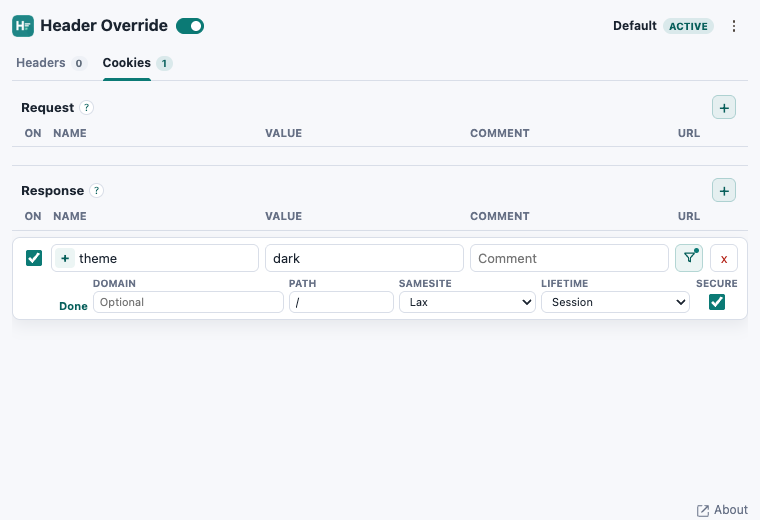
- Open Cookies and click + beside Response. Enter theme in Name and dark in Value. Keep the + (Add) operation.
- Click Edit. Set Path to /, leave Domain empty for the current host, choose SameSite Lax and Lifetime Session, and enable Secure for an HTTPS website. Click Done.
- Click the rule's URL filter button, choose Custom URL, and enter |https://example.com/*. Replace example.com with your test domain; * matches all paths on that domain. Then click Done.
- Make sure the rule and extension are enabled, then reload the website. The response stores the cookie; a later matching request sends it back to the server.
theme=darkThis is a test value: the website must use a theme cookie for it to change the appearance. To replace an existing cookie, match its name, domain, and path. Otherwise, you may create a second cookie.
Check that your cookie changed
In Chrome or Edge, open developer tools → Application → Storage → Cookies and select your website. In Firefox, open developer tools → Storage → Cookies. Check the value, domain, and path.
For a one-time change, you can also edit the cookie directly in developer tools. See Chrome’s cookie editing instructions.
Request cookies or response cookies?
Use Response to update a stored cookie. Request cookie rules append a cookie to outgoing requests without updating browser storage, and can send a duplicate name if that cookie already exists.
Restore the original cookie
Disable or delete the rule first. Then restore the original cookie value, or delete your test cookie, in developer tools. Disabling the rule alone does not undo a cookie already stored in the browser.
Related guides: Why Does My API Return 401 After Login? · How to Modify Response Headers.
Try it on your website
Modify cookies with the Header Override extension.
Set a cookie for one website, verify the stored value, and restore the original.