CORS & APIs · 8 min read
Why Does My API Work in Postman but Fail in the Browser?
Learn how to diagnose browser API failures and edit headers in browser by separating CORS, authentication, cookies, preflight requests, and real server errors.
Postman and a browser do not make requests under the same rules. Postman is an API client, so it can send a request without the browser's same-origin checks, preflight process, or cookie policies. A request succeeding in Postman proves that the server can respond to that request. It does not prove that a web page is allowed to make or read the same request.
If you need to edit headers in browser, use a browser extension to modify headers only for the API URLs you are testing. Header Override keeps those experiments local and scoped while you diagnose the real server-side fix.
The short answer
When an API works in Postman but fails in the browser, check these four things in order:
- Did the browser send an
OPTIONSpreflight? - Did the API return the required CORS response headers?
- Did the browser send the expected authorization header or cookie?
- Did the server return a real error before CORS headers were added?
A reliable debugging order
1. Look at the browser Network tab
Do not start with the console message alone. Find the failed request in DevTools and inspect its status, request headers, response headers, and whether an OPTIONS request appeared immediately before it.
A failed preflight usually means the browser did not allow the actual request to proceed. A failed actual request means the server received it, but the response may have been rejected or hidden by the browser.
2. Check the request origin and preflight
A cross-origin request commonly includes an Originheader. A non-simple request can also trigger a preflight that describes the intended method and headers:
OPTIONS /api/profile HTTP/1.1
Origin: https://app.example.com
Access-Control-Request-Method: GET
Access-Control-Request-Headers: authorization, x-tenant-id
The server must answer with a compatible policy. If the frontend sends Authorization or a custom tenant header but the server does not allow that header, the browser can stop the request before your application sees a response.
3. Separate CORS from authentication
A console message mentioning CORS does not always mean the CORS policy is the root cause. An API might return 401,403, or 500 without adding CORS headers to its error response. The browser then reports a CORS problem even though the first failure was authentication, authorization, or a server exception.
Compare the browser request with the working Postman request: check the bearer token, cookies, tenant identifier, API version, and content negotiation headers. One missing header can change the response completely.
4. Check cookies separately
Cookie-based authentication adds another layer. The frontend may need credentials enabled, and the cookie itself may be restricted by its domain, path, SameSite, orSecure attributes. A cookie visible in one browser context is not automatically sent to every API origin.
In DevTools, confirm whether the request contains aCookie header. If it does not, inspect the cookie attributes before changing the CORS policy.
Where Header Override helps
Once you understand which value is different, Header Override can help you reproduce the browser request without editing your frontend code. Create a request-header rule for the API URL and add the value you want to test:
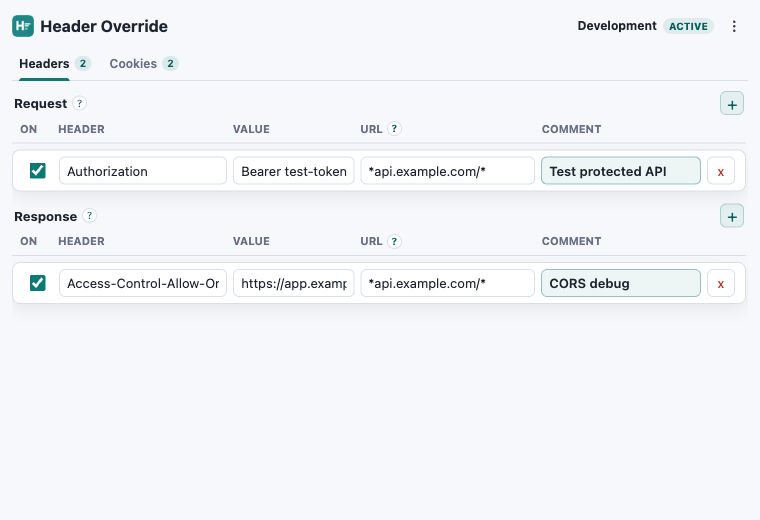
Header: Authorization
Value: Bearer test-token
URL: *api.example.com/*
Comment: Reproduce the staging auth flow
You can use the same workflow for an API version, tenant, locale, feature flag, or other custom request header. For cookie-based flows, use the Cookies tab and scope the rule to the smallest URL pattern that reproduces the issue.
Profiles are useful when you need separate setups for local, QA, and staging environments. Disable a profile when you finish testing so a temporary rule does not affect unrelated requests.
When not to use it
A local override is a debugging aid, not a production fix. Do not use it to hide an insecure CORS policy, bypass authorization, or work around a missing server-side security control. Never put real credentials in a rule that might be shared or exported.
If the override makes the request work, record the exact header or cookie difference and fix the application, API gateway, or server configuration that owns it.
Reproduce the request locally
Test headers and cookies without changing application code.
Header Override stores scoped rules locally in your browser and works in Chrome, Edge, and Firefox.