Authentication & Cookies · 8 min read
Why Does My API Return 401 After Login?
Learn how to debug an API that returns 401 after login with a modify header extension by checking bearer tokens, authentication cookies, browser credentials, refresh flows, and proxies.
A successful login does not automatically authenticate every request that follows. Login may return a token that the frontend must store and attach, or it may set a cookie that the browser will only send under specific domain, credential, and SameSite rules.
A browser extension to modify headers can help isolate whether the missing credential is the real cause. Use Header Override to edit headers in browser for a narrowly scoped test, then apply the permanent fix in your application or API gateway.
What a 401 response means
401 Unauthorized means the API could not accept the request's authentication credentials. The request may be missing a token, contain an expired token, send the token in the wrong format, or omit the session cookie entirely.
This is different from 403 Forbidden. A 403 usually means the server recognized the caller but decided that the caller does not have permission for that resource.
A reliable debugging order
1. Compare the login request with the next API request
In the browser Network tab, find the login response and the first request that returns 401. Check whether the login response contains a token in its body or a Set-Cookie header. Then check whether the next request contains the corresponding credential.
For bearer-token authentication, the request usually looks like this:
GET /api/account HTTP/1.1
Authorization: Bearer eyJ...
If the login succeeds but this header is missing, the problem is in the frontend token storage or request client configuration, not in the protected endpoint.
2. Check the exact authorization format
Look for small differences: Bearer must be followed by a space and the token, the header name must be correct, and a refresh response must not be mistaken for an access token. Also check whether a proxy or API gateway removes the header before the request reaches the application.
3. Check whether the browser sends the session cookie
For cookie-based sessions, the request must contain the expected cookie. Cross-origin frontend requests commonly need credentials enabled in the client, while the cookie may also be restricted by its Domain, Path, SameSite, or Secure attributes.
fetch("https://api.example.com/account", {
  credentials: "include"
});
If the login response sets a cookie for a different host, or the browser rejects the cookie because of its attributes, the next request will look anonymous even though the login endpoint returned 200.
4. Check token expiry and refresh behavior
A token can be valid when the page loads and expired by the time a request runs. Confirm the token's expiry, verify that the refresh request succeeds, and check that the client replaces the old access token before retrying the failed request.
Be careful with automatic retries: a failed refresh can create a loop where the application repeatedly sends the same expired token and hides the original error.
5. Check the server and gateway logs
If the browser clearly sends the expected credential, inspect the API and gateway logs. Confirm that the request reaches the intended service, the issuer and audience match, the signing key is current, and the gateway forwards the authentication header.
Where Header Override helps
Header Override can isolate whether the protected endpoint works with a known test credential. Create a request-header rule for the smallest API URL pattern you need:
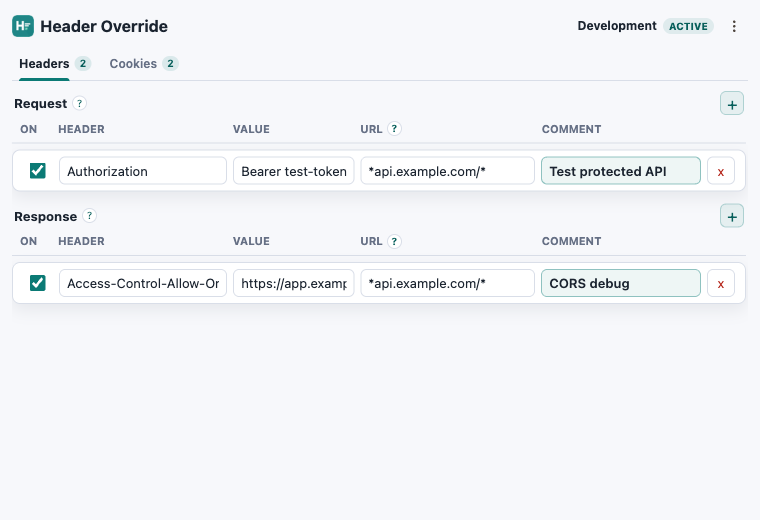
Header: Authorization
Value: Bearer test-token
URL: |https://staging.example.com/api/*
Comment: Test the protected account request
If the request succeeds with the local rule, the endpoint and browser network path are probably healthy; focus on how the application stores, refreshes, or attaches its real token. If it still returns 401, inspect the token claims, gateway behavior, and server-side authentication logs.
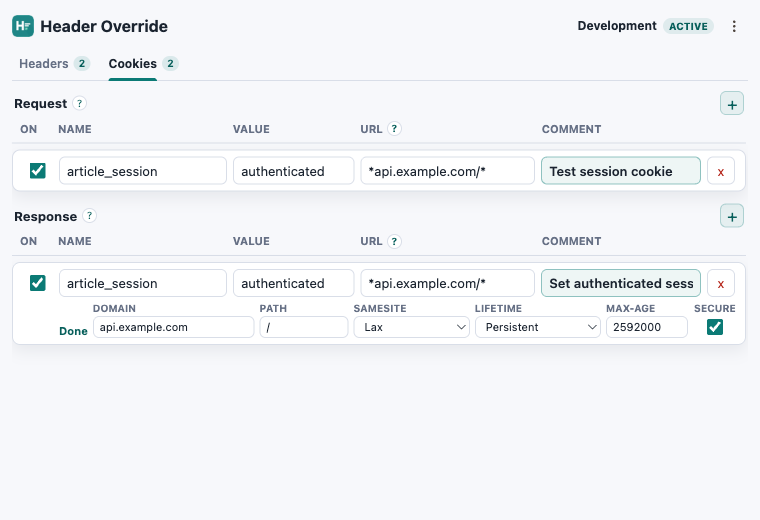
For session-based authentication, use the Cookies tab to test a controlled cookie value or response-cookie attribute. Profiles let you keep separate test credentials for local, QA, and staging environments, while URL filters prevent a temporary rule from affecting unrelated sites.
Related guides: How to Modify Cookies.
Trace the missing credential
Test authentication headers and cookies locally.
Header Override stores scoped rules locally in your browser and works in Chrome, Edge, and Firefox.