CORS & APIs · 6 min read
How to Debug CORS Preflight Requests
Understand browser OPTIONS preflight requests, allowed methods, allowed headers, credentials, and the fastest way to isolate a CORS failure.
A CORS preflight is an automatic OPTIONS request that the browser sends before certain cross-origin requests. It asks the API whether the method and headers are allowed before sending the real request.
What the preflight does
A request with a custom header or a non-simple method can produce a request like this:
OPTIONS /api/account HTTP/1.1
Origin: https://app.example.com
Access-Control-Request-Method: POST
Access-Control-Request-Headers: authorization, content-type
The API must return a compatible policy, including the allowed origin, method, and request headers. If it rejects the preflight, the browser stops before the application request is sent.
Debugging checklist
1. Find the OPTIONS request
Open the Network tab, enable the request method column, and find the OPTIONS request immediately before the failed call. Check its status and response headers instead of relying only on the console message.
2. Compare requested and allowed headers
Compare Access-Control-Request-Headers with Access-Control-Allow-Headers. A custom tenant, trace, or authorization header must be allowed by the API.
3. Check credentials separately
Credentialed requests need an explicit origin and Access-Control-Allow-Credentials: true. An * origin cannot be used for a request that includes cookies.
4. Check the error response
If the API returns 401, 403, or 500 without CORS headers, the browser may report a CORS error while hiding the actual server failure. Inspect server logs and authentication values too.
Where Header Override helps
Use a modify header extension to test the exact request or response value while you diagnose the server configuration. Header Override lets you edit headers in browser with a URL-scoped rule:
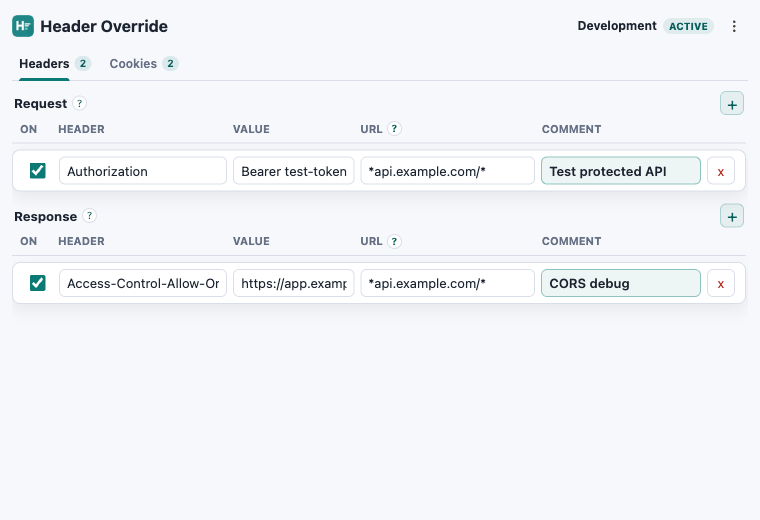
After the test, move the durable CORS policy into the API, gateway, or server configuration. A local override is for diagnosis, not production security.
Related guides: How to Modify Response Headers.
Inspect the preflight
Edit headers in browser while debugging CORS.
Header Override stores scoped rules locally and works in Chrome, Edge, and Firefox.