Authentication & Cookies · 5 min read
Debug with Header Profiles
Keep local, QA, and staging headers and cookies separate with browser profiles for repeatable debugging workflows.
Temporary headers and cookies are useful during debugging, but they become risky when the same rules follow you from local development into QA or staging. Profiles let you keep each environment's browser request setup separate.
Why use profiles
A local API may need one tenant header, a QA environment may need a test session cookie, and staging may need a feature or authorization value. Keeping those rules in one long list makes it easy to send the wrong value to the wrong host.
A repeatable workflow
- Create one profile for each environment or test setup.
- Scope every header and cookie rule to the smallest matching URL.
- Add comments that explain the temporary debugging purpose.
- Activate only the profile needed for the current investigation.
- Disable or delete the profile when the test is complete.
Set up profiles in Header Override
Header Override is a browser extension to modify headers and cookies with local profiles. Use the profile menu to switch between Development, QA, staging, or test-account configurations without rebuilding the frontend.
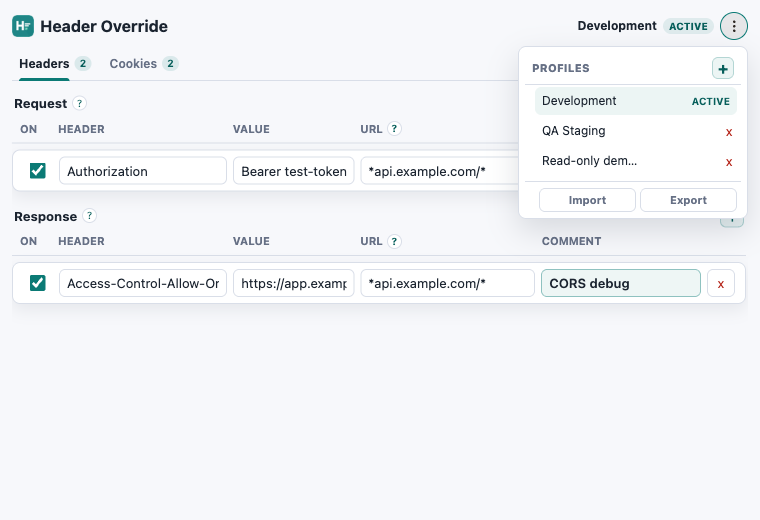
Profiles are stored locally in the browser. URL filters still matter: a profile can be active while its rules remain limited to the exact API or application URL you selected.
Need a practical example? How to Change User Agent in Chrome, Edge & Firefox.
Keep debugging repeatable
Edit headers in browser with separate profiles.
Header Override stores local rules in your browser and works in Chrome, Edge, and Firefox.