Authentication & Cookies · 6 min read
How to Test Admin Permissions Without Multiple Accounts
Reproduce role-based access and 403 permission problems in the browser by testing scoped authorization, tenant, and feature headers with safe local rules.
Testing role-based access often becomes slow when every scenario requires a separate login, account, or browser profile. A controlled local header can help you reproduce the request context while you investigate a 403 response.
401 vs 403
A 401 response means the API did not accept the authentication credential. A 403 response usually means the API recognized the caller but denied access to the resource. Confirm which response you have before changing login code.
Debugging checklist
Identify the authorization source
Find out whether the server derives the role from a token claim, session cookie, tenant header, feature flag, or gateway-provided identity. Check the request and server logs together.
Compare a permitted and denied request
Capture both requests and compare the URL, method, authorization value, tenant context, and resource identifier. A missing tenant or scope can look like a general permission failure.
Test the smallest protected route
Start with one endpoint and one test account. Use a narrow URL filter so the temporary rule does not alter unrelated API calls or browser tabs.
Where Header Override helps
A browser extension to modify headers can reproduce a known test role or tenant value without rebuilding the frontend. Create a request rule with the exact authorization value expected by your staging API:
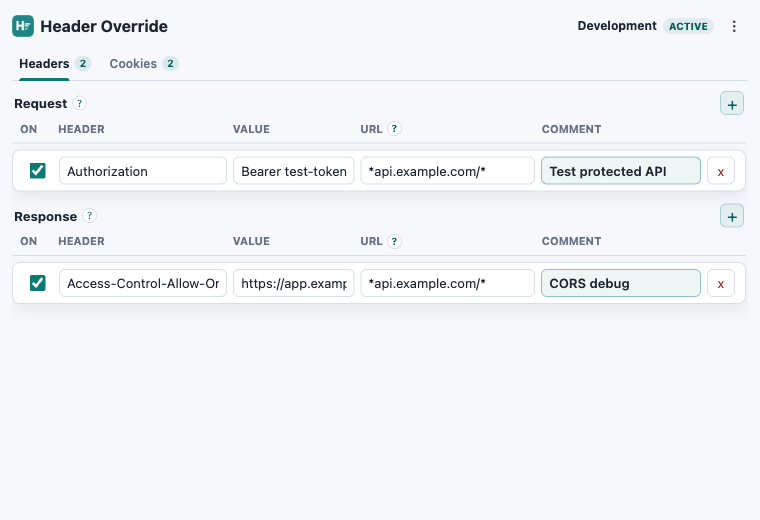
Header: Authorization
Value: Bearer test-token
URL: *api.example.com/*
Comment: Test protected API
If the request succeeds only with the override, focus on the application's token claims, role mapping, tenant lookup, or gateway configuration. The local rule should reveal the missing input, not become the production authorization mechanism.
Test one permission path
Edit headers in browser while reproducing a 403.
Header Override stores scoped rules locally and works in Chrome, Edge, and Firefox.